Digital Menu Pricing Psychology: 9 Layout Tricks That Increase Average Order Value
Discover 9 digital menu pricing psychology tricks that boost restaurant order values. Actionable layout changes backed by data for 2026.
On this page 6
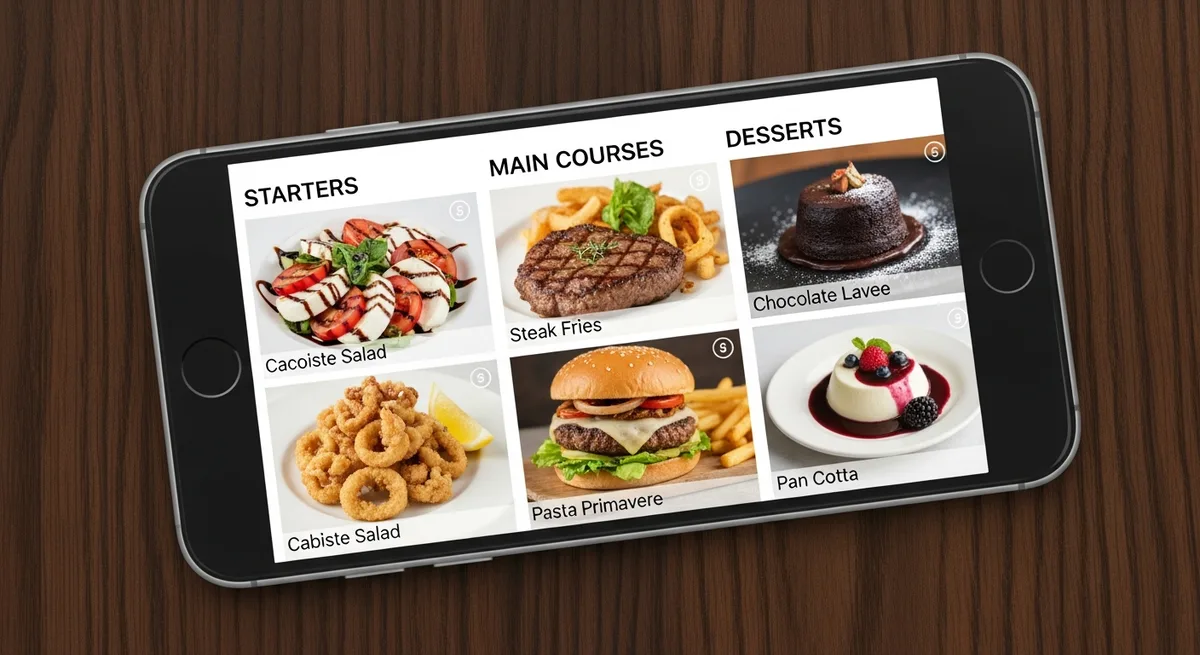
A customer stares at your menu for roughly 109 seconds before deciding what to order. On a phone screen, that window shrinks to about 70 seconds. Every pixel of your digital menu is either making you money or leaving it on the table - and most restaurant owners have never thought about which one it is.
The shift from paper to digital menus isn't just a format change. It rewrites the psychology of how people choose what to eat. The layout tricks that worked on a laminated tri-fold don't translate to a 6-inch scrollable screen. Here's what actually works in 2026, backed by research and real-world restaurant data.
Why Paper Menu Psychology Breaks on a Phone Screen
For decades, menu engineers relied on the "Golden Triangle" - the idea that a diner's eyes land on the center of a menu first, then drift to the top right, then top left. Restaurant consultants built entire careers around placing high-margin items in those zones.
The problem? That model was designed for two-panel paper menus held at arm's length. On a smartphone, there is no triangle. There's a scroll. Your customer sees one narrow column, and they swipe through it top to bottom.
Research from the Cornell Center for Hospitality Research confirms that digital reading patterns follow a strong top-down bias. Items at the top of each visible screen get disproportionate attention, while items buried mid-scroll are often skipped entirely. That single difference demands an entirely new approach to digital menu pricing psychology.
The Scroll Hierarchy: Where Attention Goes on a Vertical Digital Menu
Think of your digital menu as a series of "screens" rather than one long page. Each time a customer pauses their scroll, they see a window of roughly 3-5 items. The first and last items in that window receive the most attention - a pattern psychologists call the serial position effect.
This matters for pricing. If your highest-margin dish sits in the dead center of a 12-item category, it's in a visual dead zone. Move it to position one or two in the list, and you can see a measurable bump in orders.
What to do: Audit each menu category and place your two highest-margin items in the first and last positions. This simple reordering costs nothing and can lift average order value by 8-12%.
Price Anchoring and the Power of Photos
Price anchoring is even more powerful on digital because the first item a customer sees sets the tone for the entire scroll. Lead a category with your premium offering - not hidden at the bottom, but proudly at the top with a compelling photo and description.
A 2024 study in the Journal of Consumer Research found that digital menus with a visible premium anchor in the first scroll position increased mid-tier item selection by 16%.
And if there's one change that delivers outsized results, it's adding professional photos to specific menu items - not all of them. Research consistently shows that a quality image next to a menu item increases orders by 25-30%. But photographing every dish actually hurts performance - when everything has a photo, nothing stands out.
The strategy: choose 2-3 high-margin items per category and give only those items photos. With a platform like Vino, you can update which items get photos on the fly.
Category Naming and Descriptions That Frame Value
Most digital menus use generic category names: "Appetizers," "Entrees," "Desserts." These are functional but psychologically flat.
Rename your categories to signal value and create anticipation:
- "Appetizers" → "Start With Something Great"
- "Entrees" → "Chef's Main Plates"
- "Sides" → "Perfect Additions"
- "Desserts" → "A Sweet Finish"
Cornell research found that descriptively labeled menu items increased sales by 27% and improved customer satisfaction. On a digital menu, you have more room for description than a cramped paper layout. A two-line description mentioning origin, technique, or flavor profile makes a $19 dish feel worth $19.
A/B Testing Your Digital Menu Pricing Psychology
Here's where digital menus leave paper in the dust. You can test changes, measure results, and iterate.
Run simple A/B tests:
- Week 1: Current item order. Track orders per item and average check.
- Week 2: Reorder items using the scroll hierarchy principles above. Compare.
Digital menu platforms can track which items get the most views, how far customers scroll, and where they drop off - data that turns menu design from guesswork into strategy.
9 Layout Changes You Can Make Today
- Lead every category with your highest-margin item. First position gets the most eyes.
- Add a photo to your top 2 profit items per category - and only those items. Selective imagery creates visual pull.
- Place a premium anchor at the top of each section. Let a $42 item make your $26 item feel like a smart choice.
- Remove dollar signs from prices. Research shows "$19.00" triggers more price sensitivity than "19".
- Rename categories with descriptive, appetizing language.
- Write 1-2 line descriptions for your top 5 most profitable items.
- Use bold or a subtle highlight on items you want to push.
- Limit each category to 7-10 items. Too many options leads to decision fatigue.
- Place an upsell prompt between categories. A simple "Add a side?" between sections catches customers in a decision-making moment.
Every restaurant invests in training servers to upsell. Few invest the same effort in their menu - the one "salesperson" that talks to every single customer, every single time. Pick three from the list, implement them this week, and measure for two weeks. With a platform like Vino, you can start testing these changes today at a fraction of the cost of a menu consultant. Your menu will start earning the way it should.
Ready to go digital?
Create your restaurant's smart digital menu in minutes with Vino. No app downloads, no complicated setup.
Related articles
We Analyzed 30,000 QR Menu Interactions. Here Is the Data on How Diners Really Read Your Menu.
8 min read

Why Every Restaurant Owner Needs a Peer Community
5 min read
Digital Menu Without a POS: Toast & Square Alternatives
6 min read
Digital Menu Customer Journey for Customer Retention
6 min read