Restore deleted menu items from Trash
Deleted menu items and categories stay in Trash for 30 days. Learn how to restore them or permanently delete to free space.
When you delete a menu item or category in Vino, it is not gone for good. Instead it moves to a recoverable Trash for 30 days, so you can bring it back if you change your mind or remove it permanently to free up space right away. After 30 days, anything in Trash is purged automatically.
Open the Trash page
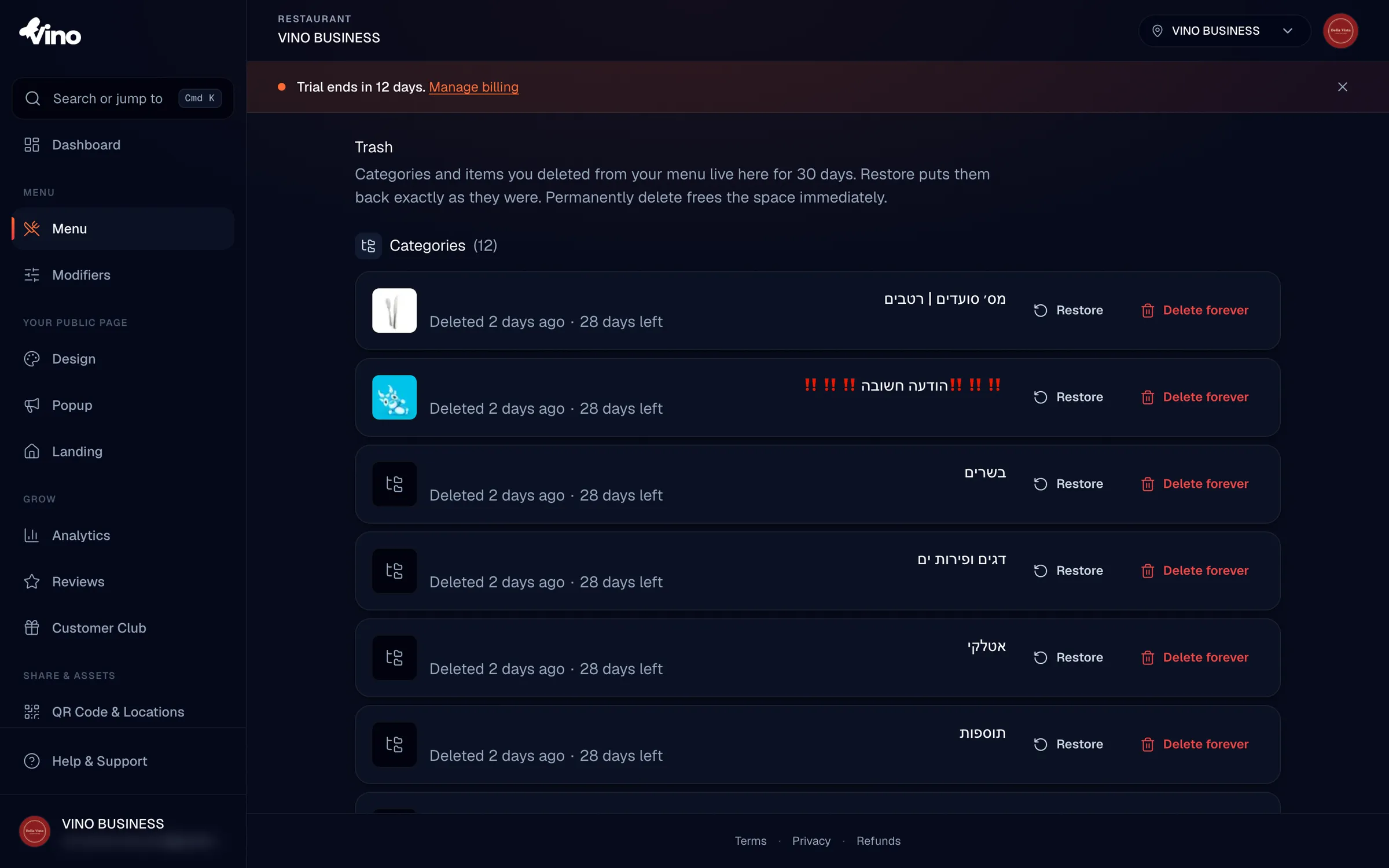
From your dashboard, click Trash in the left navigation menu. This opens a single page where every soft-deleted category and item lives, so you can review and recover anything you removed within the last 30 days.
If you manage multiple locations, Trash only shows deleted content for your currently active location and default menu.
Review your deleted content
The Trash page is split into two sections: Categories at the top and Items below. For each deleted item you'll see its name, thumbnail, when it was deleted and how many days remain before it's permanently removed. The 30-day countdown is tracked per item, based on each item's own deletion date, not from a single batch.
If a deleted item's parent category is also in the Trash, a yellow "Parent in trash" badge appears next to the category name. This is informational only and does not stop you from restoring the item.
Restore a category or item
To bring something back, click the Restore button next to it. The category or item returns to your live menu exactly as it was before you deleted it. Restoring is instant and does not affect anything else in your menu.
How parent-child relationships are handled when you restore:
- Item whose category is still in Trash: the item restores back to its original category, even though that category remains in the Trash.
- Item whose category was permanently deleted: the item becomes uncategorized when restored, and stays in your menu.
- Category whose parent is still in Trash: the category restores to its original parent. Until that parent is also restored, your public menu shows the category at the top level automatically.
Permanently delete to free space
If you're sure you no longer need something, click Delete forever, then confirm in the dialog that appears. This removes the item or category immediately instead of waiting out the 30-day window. Permanent deletion cannot be undone, so double-check before confirming.
What gets removed when you delete forever:
| You delete | What happens |
|---|---|
| A category | The category is removed permanently, but items inside it become uncategorized and stay in your menu. |
| An item | The item is removed along with all its variations and any modifier group links. |
Delete forever is permanent. Once you confirm, the category or item cannot be recovered.
What happens after 30 days
You don't have to clean up Trash yourself. Anything left in Trash is automatically and permanently removed 30 days after it was deleted. The countdown shown on each row tells you exactly how long you have left to restore it.
Still stuck? Email us at info@vino-smart.com and we'll help you recover your menu.