Scan to order, call a waiter, ask for the bill
Every table gets its own QR code. Guests order from their phone, call a waiter or ask for the bill with one tap, and your team sees every request on one live board. No app for guests and no commission on your sales.
Included in Pro. Online reservations and POS integrations come with Business.
What is a QR ordering system?
A QR ordering system lets guests order at the table from their own phone. They scan the code on the table, the menu opens in the browser, and the order goes to the kitchen without anyone waiting for a server with a notepad.
Vino adds this to the digital menu you already run. You map your floor plan, print a code for each table, and every order, waiter call and bill request arrives tied to the right table. Your staff still run the room. The QR code takes care of the ordering and the requests.
Two sides of the same table
For guests
Scan the table code
The menu opens in the phone's browser. There is nothing to download.
Browse in their language
Photos, prices and allergens, in any of the languages you turn on.
Order from the seat
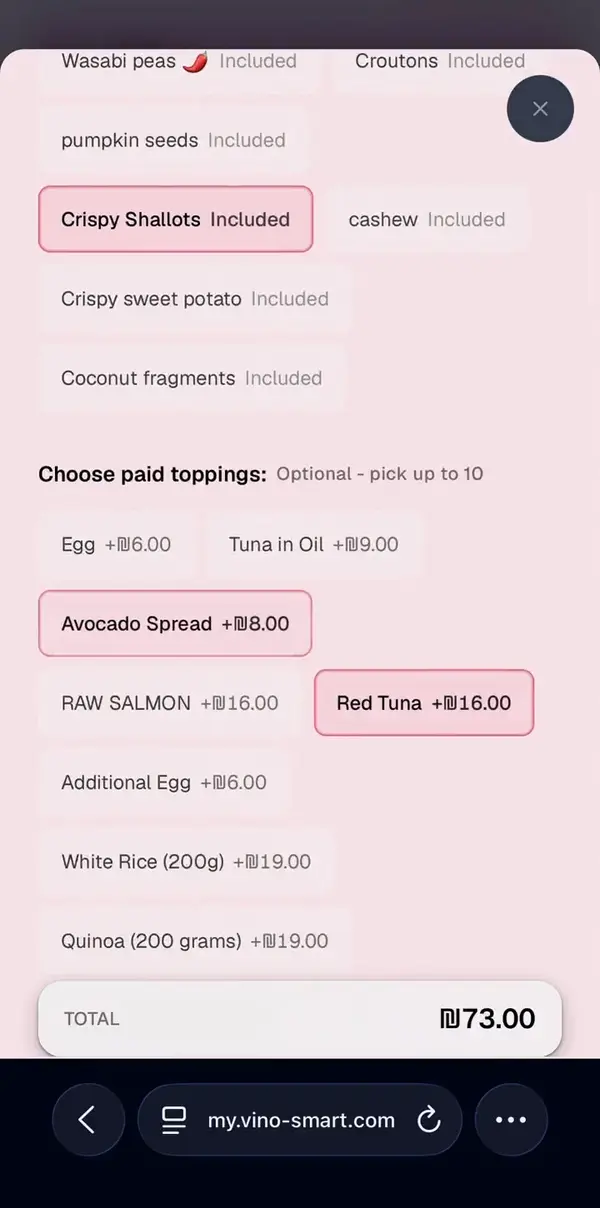
They choose sizes and extras, see the total and send the order.
Call a waiter or ask for the bill
One tap each, whenever they are ready.
For your team
Set up your tables
Map zones and tables on a floor plan and print a QR code for each table.
Work the live board
Orders, waiter calls and bill requests appear on one screen as they come in.
Print the ticket
Each order prints in the kitchen as a branded ticket.
Connect your POS Business and up
Signed order webhooks push table orders to your POS or kitchen printer.
Everything table service does today
The full table service suite comes with Pro. Business adds reservations, POS and printer integrations, and table-service numbers in your analytics.
Floor plan and table QR codes
Zones and tables on a visual plan, with a QR code per table so each order is tied to the right one.
QR scan-to-order
Guests browse your live menu and send their order to the kitchen from the table.
Call a waiter
One tap pings your staff, so guests never have to catch someone's eye.
Request the bill
Guests ask for the check from their phone when they are ready, so tables close sooner.
Live service board
Every order, waiter call and bill request on one screen, as it happens.
Kitchen ticket printing
Orders print as clean, branded tickets, so the kitchen sees exactly what guests sent.
Online reservations
A branded booking page with live table availability.
POS and printer integrations
Signed order webhooks push table orders to the POS or kitchen printer you already use.
Table-service numbers
Orders, waiter calls and bill requests in your analytics dashboard.
Which plan includes table service?
Table service is part of Pro. Business adds the parts that connect it to the rest of your restaurant.
Pro
$29/month
Table service, ready to go
- Floor plan and table QR codes
- QR scan-to-order
- Call a waiter and request the bill
- Live service board
- Kitchen ticket printing
Business
$79/month
Everything in Pro, plus
- Online reservations
- POS and printer integrations
- Table-service numbers in analytics
- 3 locations included
Pro and Business start with a 14-day free trial for first-time subscribers. Vino takes no commission on your sales.
Compare all plansTable service questions
It is a menu that takes orders. Guests scan a QR code on the table, the menu opens in their phone's browser, and they send the order from there. With Vino, each table has its own code, so every order, waiter call and bill request arrives tied to the right table.
No. The menu opens in the phone's web browser right after the scan, on iPhone and Android alike. There is nothing to install.
Guests tap a button on the menu to call a waiter or ask for the bill. The request shows up on your live service board in real time, next to incoming orders, so your staff can see which table needs them.
Yes. A dish can have sizes and option groups such as extras or sauces, each with its own price and rules, like a choice the guest has to make before ordering. The total updates as they pick.
Pro, at $29 a month: floor plan and table QR codes, scan-to-order, waiter calls, bill requests, the live service board and kitchen ticket printing. Business, at $79 a month, adds online reservations and POS and printer integrations. Both start with a 14-day free trial for first-time subscribers.
No. Table service works on its own, and orders print in your kitchen as branded tickets. If you already run a POS or a kitchen printer setup, the Business plan adds integrations that send table orders to it through signed order webhooks.
No. You pay a flat monthly price for your plan, and diners pay through your own payment processor, so Vino never takes a cut of your sales.
Your menu can run in up to 9 languages, and guests switch with one tap from the language selector at the top of the menu. Hebrew and Arabic display right to left.
Guides, articles and next steps
Help center
From the blog
Try table service on your own tables
Pro comes with a 14-day free trial: map your floor plan, print your table codes and take your first order from a table. Or book a demo and we will show you around first.