Why Is a Feature Locked? Plans Explained
Understand why a feature shows a lock or upgrade prompt, which features need Pro, Business, or Studio, and how to upgrade in a few clicks.
A lock icon or "upgrade" prompt simply means the feature you tapped is part of a higher plan than the one you're on. Vino offers four subscription tiers, Free, Pro, Business, and Studio, and each unlocks a different set of capabilities. This article explains what each plan includes and how to upgrade so the feature you want stops showing a lock.
Why a feature is locked
Vino enforces plan limits so that each tier gets exactly the features it pays for. When you try to use a tool or go past a limit that isn't included in your current plan, the app shows a lock or an upgrade prompt instead of letting you continue. The prompt names the plan that unlocks the feature, so you always know which tier to move to. Nothing is broken, you just need the right plan.
Paused or canceled subscriptions are treated as Free for feature access, so paid features lock immediately even though your Plan & Billing page still shows your paid plan name with a "Paused" or "Canceled" badge.
What each plan includes
Use the table below to see which tier unlocks the feature you're after. If your goal is in a higher row than your current plan, that's why it's locked.
| Plan | Price | What you get |
|---|---|---|
| Free | $0 | 1 location, up to 5 categories, up to 25 menu items, basic digital menu + QR codes, email support |
| Pro | $29/month | Unlimited categories and items, custom domain, remove Vino branding, logo on QR codes, theme customization, promotional popups, landing page |
| Business | $79/month | Everything in Pro, plus up to 3 locations (extra locations $19/month each), advanced analytics, REST API, priority support, and the full AI suite |
| Studio | $99.90/month | Everything in Business, plus Guest Video Rewards: guests film short review videos, AI screens quality, and you keep the footage for your marketing |
The Business AI suite covers auto-translate, menu scan, image enhancement, image generation, and alt text.
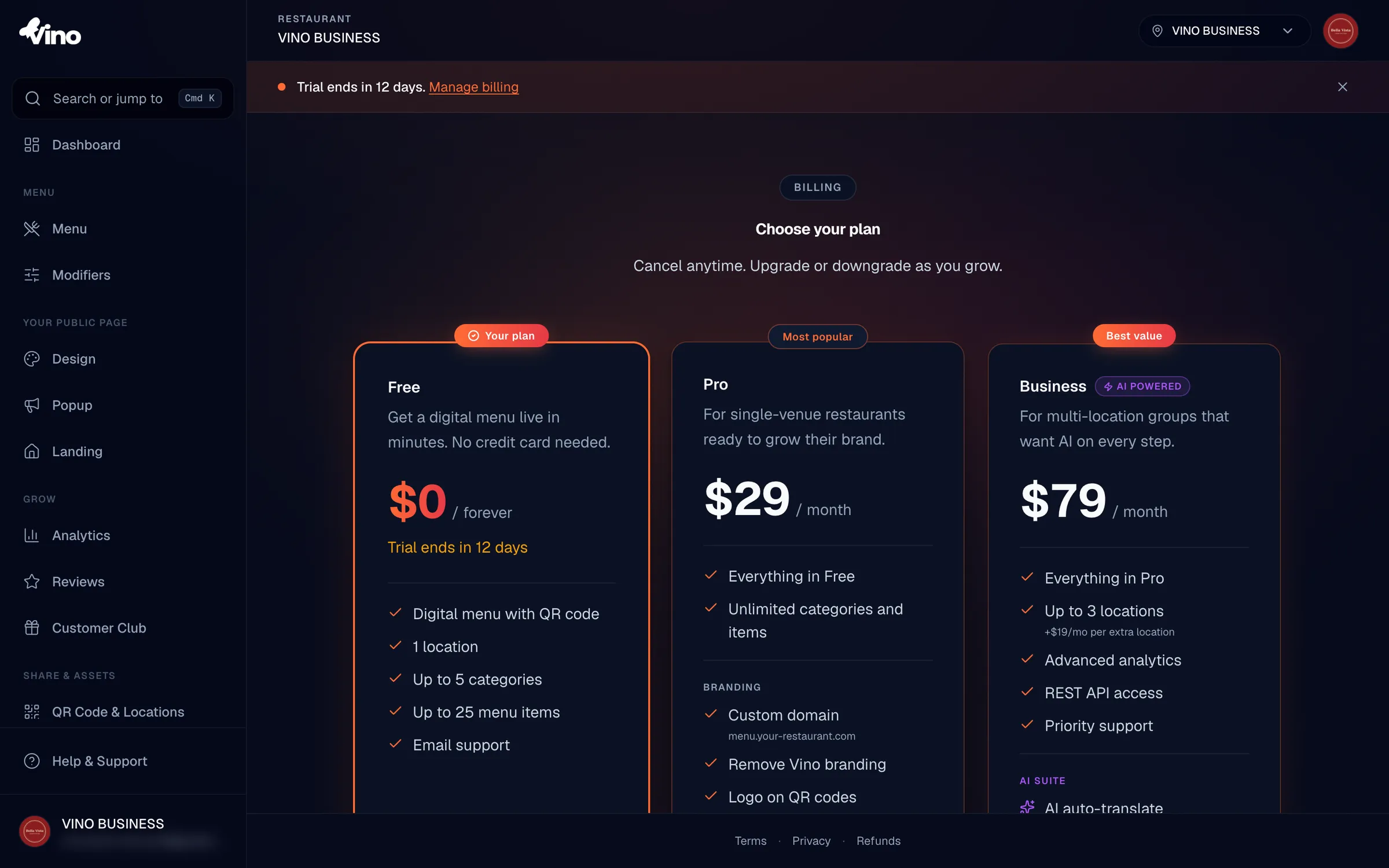
Features that require Pro
If you hit a lock while trying to do any of the following, you'll need to upgrade from Free to Pro:
- Add more than 5 categories or more than 25 menu items
- Use a custom domain for your menu
- Remove Vino branding from your menu
- Add your logo to your QR codes
- Customize your menu theme
- Create promotional popups
- Build a landing page
Features that require Business
These tools are part of the Business plan, so they stay locked on Free and Pro:
- Run more than one location (Business includes up to 3; extra locations are $19/month each)
- View advanced analytics
- Use the REST API
- Get priority support
- Use any AI tool: auto-translate, menu scan, image enhancement, image generation, or alt text
If you only need a single Pro-level feature like popups or a landing page, Pro is enough. Reach for Business when you need multiple locations, the AI suite, or advanced analytics.
Features that require Studio
Guest Video Rewards is the one tool that needs the Studio plan, so it stays locked on Free, Pro, and Business:
- Invite guests to film short review videos straight from your public menu
- Let AI screen each clip for quality and authenticity
- Reward approved guests with a voucher for a free menu item you choose
- Download the full-size originals for your own marketing
How to upgrade and unlock the feature
To remove a lock, move to the plan that includes the feature:
- Click your avatar in the dashboard menu and select Plan & billing.
- Click Change plan to open the pricing page.
- Choose Pro, Business, or Studio and click Subscribe or Start free trial.
- Confirm your payment details in the Paddle Checkout overlay and complete the purchase.
New subscriptions are charged immediately, or start a free trial if you're eligible (first-time subscribers only; Pro and Business include a 14-day free trial, Studio includes a 28-day free trial). Once the upgrade goes through, the previously locked feature unlocks right away and you'll receive a receipt by email.
If your subscription is paused or canceled, upgrading won't be the fix, you need to resume or re-subscribe first. Open Manage billing on the Plan & Billing page to reach the Paddle portal and restore access.
Still stuck? Email us at info@vino-smart.com and we'll help you figure out which plan unlocks the feature you need.