Plans, billing, and refunds
Compare Free, Pro, Business, and Studio plans, subscribe or change plans through Paddle, manage invoices, and request a 14-day refund.
Vino Smart Menus offers four subscription tiers, with Free, Pro, Business, and Studio managed through Paddle as the merchant of record. You can subscribe, upgrade, downgrade, cancel, and manage every part of your billing from your dashboard without leaving the app.
Every account starts on the Free plan. Paid features unlock on Pro, Business, and Studio. Plan limits are enforced automatically, so locked features point you to the right tier when you try to use them.
What each plan includes
Each tier builds on the one below it, so you only pay for what your restaurant actually needs. Use the table below to compare what is included at a glance.
| Plan | Price | What you get |
|---|---|---|
| Free | $0 | 1 location, up to 5 categories, up to 25 menu items, basic digital menu and QR codes, email support. |
| Pro | $29/month | Unlimited categories and items, custom domain, remove Vino branding, logo on QR codes, theme customization, promotional popups, and a landing page. |
| Business | $79/month | Everything in Pro, plus up to 3 locations (extra locations $19/month each), advanced analytics, REST API, priority support, and the AI suite (auto-translate, menu scan, image enhancement, image generation, and alt text). |
| Studio | $99.90/month | Everything in Business, plus Guest Video Rewards: guests film short review videos, AI screens quality, and you keep the footage for your marketing. |
If you run a larger group with 10 or more locations, contact us for a custom setup instead of stacking extra-location add-ons.
Open your Plan & Billing page
Click your avatar in the dashboard menu and select Plan & billing. This page displays your current plan with a status badge and your key billing dates. The status badge tells you exactly where your subscription stands:
- Active - you are subscribed and paying.
- Trialing - you are inside your free trial.
- Payment failed - your payment method needs updating.
- Paused - your subscription is on hold and paid features are locked.
- Canceled - you keep access until your prepaid period ends, then drop to Free.
- Free - no active paid subscription.
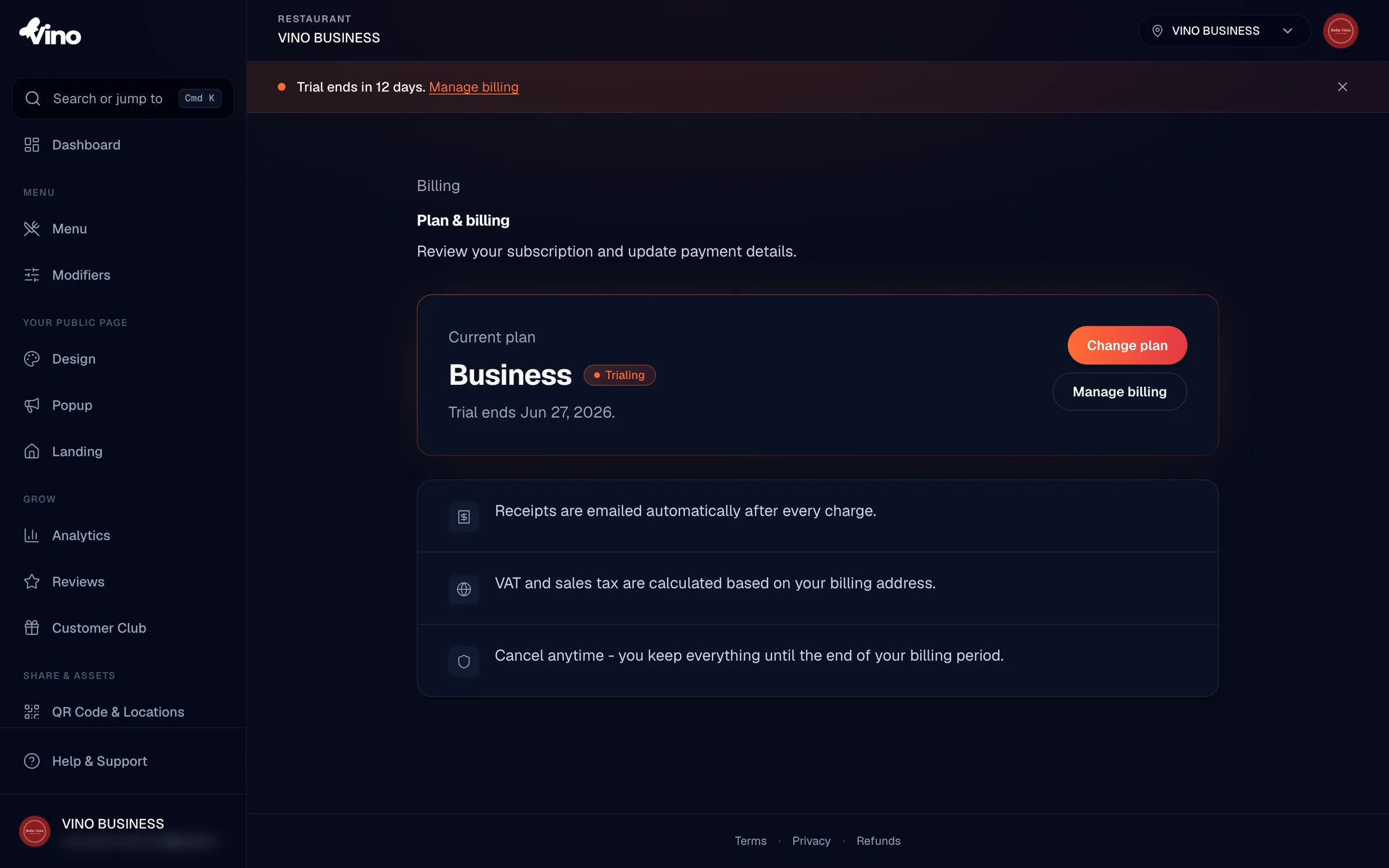
The Plan & Billing page always shows the plan you are subscribed to, even when it is paused or canceled. So you may see "Pro" with a "Paused" badge while your paid features are temporarily locked.
View your plan details
The page shows your current plan name, whether you are on a trial, when your next renewal happens, or when your access ends if you have canceled. VAT and sales tax are calculated at checkout based on your billing address, so the price you confirm at checkout already reflects any tax that applies to you.
- Renews on [date] appears for active subscriptions.
- Access ends [date] appears for canceled subscriptions still in their prepaid period.
- Trial ends [date] appears while you are inside your free trial.
Upgrade your plan
Click Change plan to open the Pricing page, select a higher tier (Pro, Business, or Studio), and click Subscribe or Start free trial. You will enter the Paddle Checkout overlay, where you enter or confirm your payment details. New subscriptions are charged immediately, or start a free trial if you are eligible (Pro and Business include a 14-day free trial; Studio includes a 28-day free trial), and a receipt is emailed to you right away.
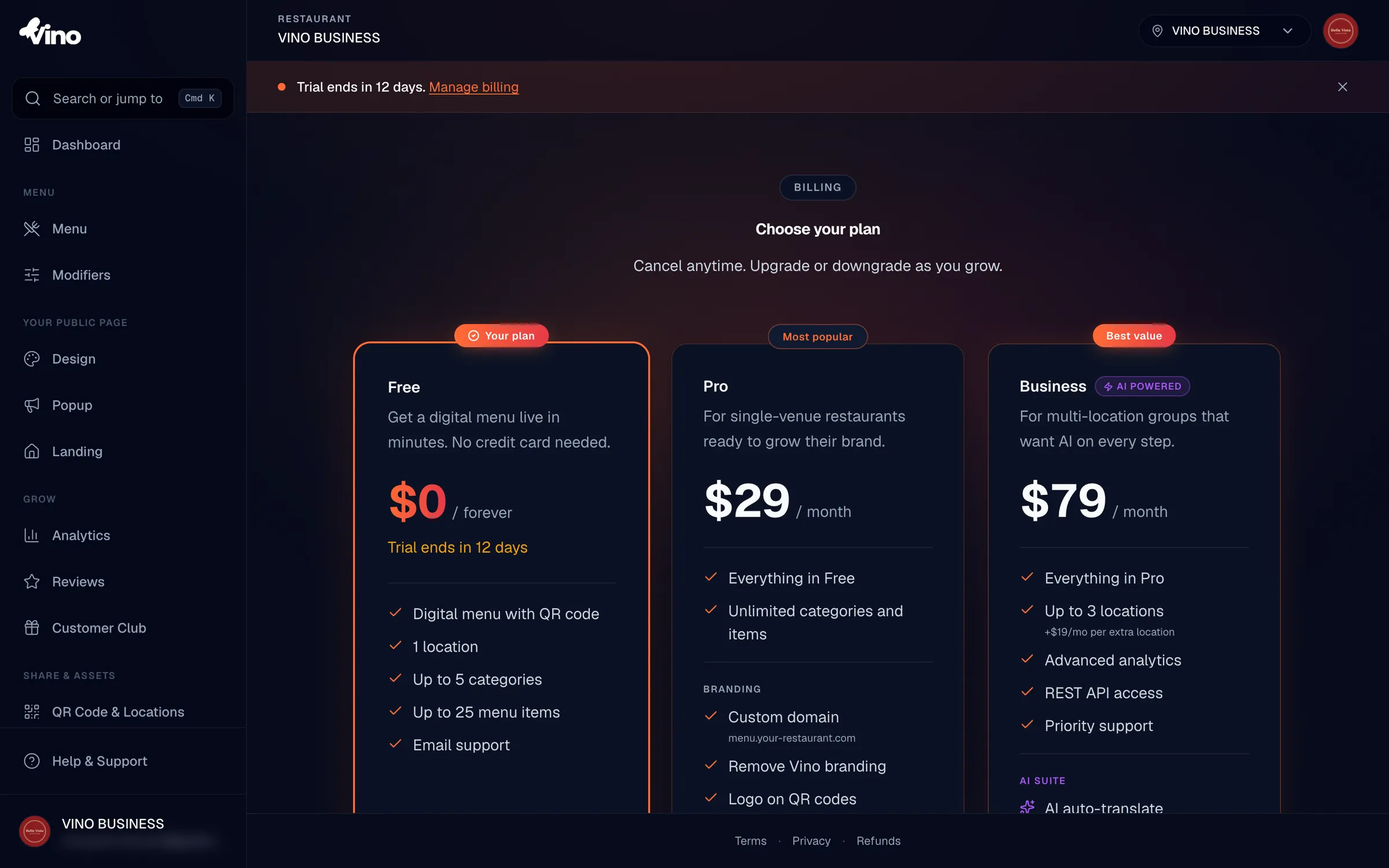
The free trial (14 days on Pro and Business, 28 days on Studio) is for first-time subscribers only. If you have held any prior subscription, even a canceled one, you skip the trial and are charged the full monthly fee immediately.
Downgrade your plan
On the Pricing page, click the call-to-action on the lower tier. A confirmation dialog appears; click Downgrade to confirm. Paddle keeps your current plan active for the rest of your billing period, then switches you to the lower tier at renewal. No refund is issued for the remaining time on your higher plan, so the change is best timed near the end of your billing cycle.
Manage billing in the Paddle portal
Click Manage billing on the Plan & Billing page to open the Paddle customer portal in a new tab. The portal is where you cancel your subscription, update your payment method, and download past invoices. Because Paddle is the merchant of record, your card details are never stored in the Vino app, and any change you make in the portal takes effect immediately.
- Cancel your subscription.
- Update your payment method or billing address.
- Download invoices and view your full payment history.
- Pause or resume your subscription.
Cancel your subscription
In the Paddle portal, open your subscription and select Cancel subscription. You can cancel immediately or at the end of your current billing period. By default you keep your plan access until the period ends, after which you are downgraded to Free automatically. Your menus and content stay in your account on the Free plan, subject to Free tier limits.
Pause instead of canceling
If you want a break without losing your subscription, choose Pause in the Paddle portal rather than cancel. Your subscription stays on hold and your paid features lock until you resume. This is handy for seasonal venues that close for part of the year.
Handle your free trial
If you are on a free trial, the Plan & Billing page shows Trial ends [date]. When the trial ends, your subscription automatically converts to paid and you are charged the monthly fee. Update your payment method in the Paddle portal before the trial ends to avoid a failed payment.
If a payment fails, your badge changes to Payment failed and Paddle retries the charge. Update your card in the portal promptly to keep your paid features from locking.
Refunds
Pro, Business, and Studio plans come with a 14-day full refund. If you decide Vino is not the right fit within 14 days of your paid subscription starting, contact us and we will issue a full refund for that charge. After the 14-day window, charges are non-refundable, and downgrades or cancellations do not refund the unused portion of the current period. To request a refund, email info@vino-smart.com with your account details.
Still stuck? Email us at info@vino-smart.com and we will help you sort out your plan, billing, or a refund.